Booking and scheduling
Let clients book without the back-and-forth.
Classes, one-to-one appointments and ticketed events, booked from a page with your name on it. A new client can book and pay the first time they see it, with no account.
Will my schedule run itself?
The problem
Most of a day’s messages are about finding a time. Each one is small, and each one is you. Then a spot opens up and the people who wanted it never hear, because the waitlist is a group chat.
What you get
Bookings that happen without you
- A weekly class grid with capacity caps, published once and repeated.
- Appointments cut from each provider’s own availability, in the service’s length.
- Requests you approve, with the client’s card held until you say yes.
- Waitlists that promote the next person automatically and tell them.
- Guest booking with no signup wall, then a one-link account claim.
Classes.
For studios and anyone who teaches a group.
- A repeating weekly grid with a capacity cap on every session.
- Cancellation and late-cancel windows you set; an on-time cancel returns the credit.
- A waitlist that refills a cancelled spot with the next person and notifies them by push and email.Starter and up
- Attendance marking, check-in by front desk or QR, and a late-arrival flag.
- Clients see spots left and book from the schedule in your app or on your booking page.
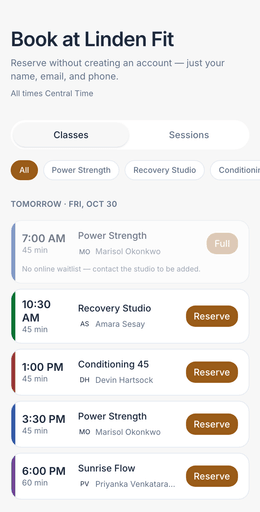
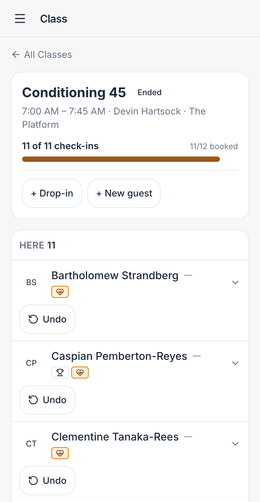
Shown in a demo studio’s own colours, with sample data.
Appointments.
For trainers, therapists, stylists, coaches and consultants.
- Services with their own length and price, per provider.
- Availability windows per provider, repeated weekly, with time off blocked out.
- Request-and-approve or instant booking, per provider. On a request, the client’s card is held for up to 7 days; approve and it is charged, decline or let it lapse and nothing is.
- A minimum notice you set, so nobody books for ten minutes from now.
- Deposit and late-cancel rules per service, recorded on every booking.
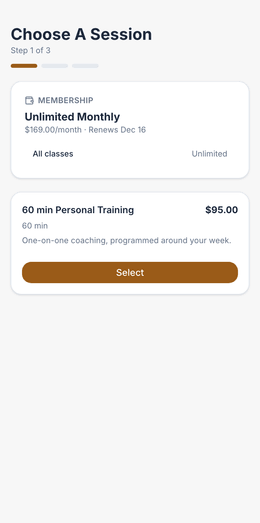
Shown in a demo studio’s own colours, with sample data.
Events.
Workshops, socials, challenges.
- Ticketed events with member pricing and group tickets, where one buyer brings friends who each get their own ticket.
- Custom questions at checkout, asked once per ticket.
- Clients cancel their own tickets inside your rules, with the refund handled.
- Reminders for events are not automatic today.
Where it starts.
- Classes, appointments, events and guest bookingSolo and up
- Waitlists with automatic promotionStarter and up
- Your own branded booking address and appStarter and up
Be one of the first 25.
Founding 25 · every feature from $39/mo · Limited to 25 businesses · closes Jan 31, 2027
No mail app? Email us at
Use the subject “Founding 25 application” and include your name, business name, business type, number of booking staff and current software.