Platform overview
One system from first visit to next booking.
Seven steps a client goes through, what Shinova does at each one, and what that means for you. Only steps that work in the product today are listed.

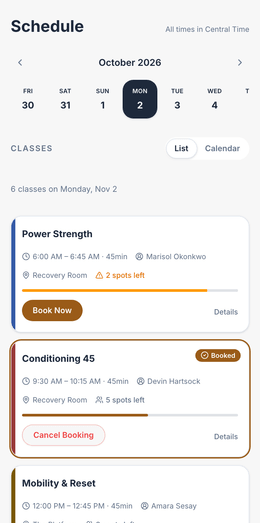
Screenshots show a demo business with sample data.
The client journey.
Each step pairs what your client experiences with what you get back.
-
A new client finds you
Discover
Your clientYour booking address (your-studio.app.shinova.io) and a landing page you build from blocks. On a phone, your business installs as an app with your name, icon and colours.
YouPublish the page once. On Starter and up it carries your branding and your own address; on Solo it is Shinova-branded.
Starts on Solo.
-
They pick a class, a time or a ticket
Book
Your clientA class with capacity and a waitlist, an appointment from a provider’s availability, or a ticketed event. Guests book and pay in one go, with no account, then claim an account from one link.
YouCapacity caps, late-cancel windows and approval requests are yours to set. An appointment request holds the card until you approve it.
Starts on Solo.
-
The waiver is signed before the first visit
Sign
Your clientA typed name and an unchecked box, after scrolling to the end. Signed copies are theirs to download.
YouEnforced in the database, not just on the screen: nobody is booked without a signed waiver, not even by your staff. A new version re-prompts everyone at their next booking.
Starts on Solo.
-
Money lands in your own Stripe account
Pay
Your clientCard on file, a pack of sessions, or a monthly membership on recurring billing, with promo codes where you allow them.
YouA Stripe account in your business’s name at Stripe’s published rate, plus one visible Shinova fee. Credits are drawn down per visit, come back on an on-time cancel and expire when you said.
Starts on Solo. Recurring memberships start on Starter.
-
Confirmations and reminders go out on their own
Get reminded
Your clientA confirmation when they book and reminders about 24 hours and 1 hour before each class or appointment, by text and push. STOP and HELP are honoured automatically.
YouNobody on your team sends anything. Clients who have not signed get the signing link in the reminder.
Starts on Solo.
-
They check in, you mark attendance
Attend
Your clientSelf check-in by QR, or the front desk marks them in. Their visit history and remaining sessions update on the spot.
YouOne record per client: visits, attendance, package balance, membership status and your message thread, with staff roles that keep money with the owner.
Starts on Solo.
-
The next booking happens without a nudge from you
Come back
Your clientA cancelled spot goes to the next person on the waitlist, who is told by push and email. Credits return on an on-time cancel. Clients can refer a friend from their own app.
YouNew enquiries land on a leads board and get an automatic text back during business hours. Follow-up sequences run on their own and stop the moment someone replies.
Starts on Growth. Waitlists start on Starter; leads, the inbox and sequences on Growth.

Shown in a demo studio’s own colours, with sample data.
The tools it can replace.
Most small businesses buy these from four vendors and retype client details between them.
-
Scheduling app
Classes with capacity, provider availability with approval, ticketed events and waitlists.
Booking and scheduling → -
Client records
Visits, packages, memberships, waivers and messages on one record, with staff roles.
Client management → -
Payments and memberships
Card on file, packs and recurring billing through your own Stripe account.
Payments → -
Texting and follow-up
A leads board, automatic follow-up sequences, and a two-way inbox for texts and email.
Marketing and follow-up →
Be one of the first 25.
Founding 25 · every feature from $39/mo · Limited to 25 businesses · closes Jan 31, 2027
No mail app? Email us at
Use the subject “Founding 25 application” and include your name, business name, business type, number of booking staff and current software.